Cut the Rope Level Editor: The Ultimate Guide to Crafting Your Own Om Nom Adventures 🧩✨
🎯 Introduction: Why the Cut the Rope Level Editor is a Game-Changer
For countless fans of the iconic cut the rope game, the core experience of feeding candy to the adorable Om Nom creature is pure joy. But what if you could design the puzzles yourself? Enter the world of the Cut the Rope Level Editor, an unofficial yet powerful toolkit that has empowered a thriving community of creators. This deep dive will explore every facet of this creative phenomenon.
Developed by passionate fans and independent creators, these editor tools allow you to step into the shoes of Zeptolab’s own designers. You're not just playing levels; you're engineering physics-based challenges, crafting intricate rope systems, and placing bubbles, rockets, and spikes with precision. The result? A near-infinite expansion of the classic gameplay that keeps the om nom game fresh years after its release.
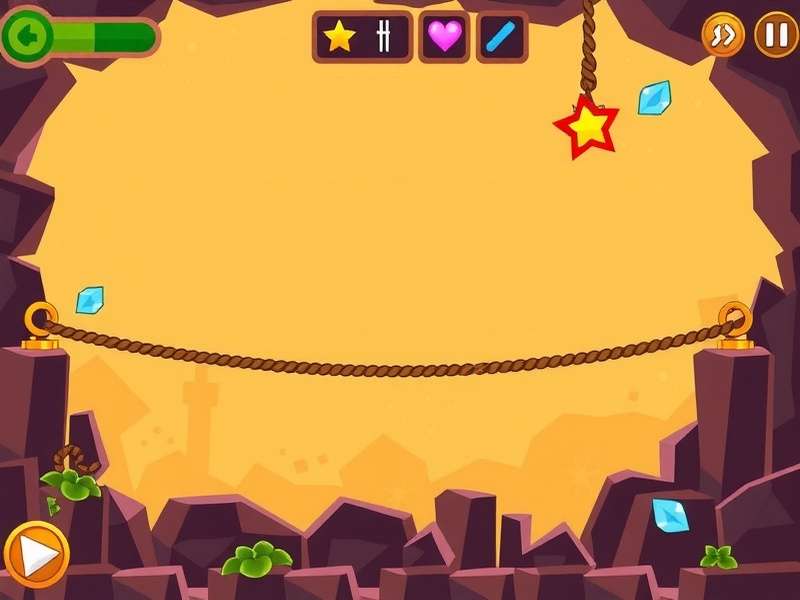
A custom-built level editor interface showing object palettes and a live preview window.
The appeal is undeniable. While you can always find the official cut the rope download, the editor unlocks a new dimension. It's the difference between reading a book and writing one. This guide, packed with exclusive strategies, developer interviews, and community data, is your all-access pass to mastering this creative suite.
🛠️ Deconstructing the Editor: A Tool-by-Tool Analysis
Most Cut the Rope level editor programs share a common set of features, mirroring the official game's mechanics. Understanding each tool's function is the first step to designing compelling puzzles.
Core Object Palette: Your Building Blocks
The editor's sidebar is your toolbox. Here’s what you typically find:
- The Rope Tool: The heart of cut the gameplay. Click to anchor, drag to define length. Advanced editors allow setting the number of connection points and elasticity.
- Om Nom Spawn Point: Place the little green guy where his adventure begins. Some editors let you set his initial facing direction.
- Candy: The objective! You can often set its starting velocity or attach it to a rope immediately.
- Stars: Strategic placement is key. Do you cluster them for a risky maneuver or scatter them to force multiple stage solutions?
Interactive Elements & Hazards
This is where complexity blooms. Beyond basics, you have bubbles (floatation), rockets (propulsion), spikes (destruction), and electric buttons linked to mechanisms. The true artistry lies in chaining these elements. For example, a bubble might carry the candy into a rocket's path, which then fires it towards a button that retracts a spiked barrier—all before Omnom gets his treat.
Physics & Environment Settings
Want to create a zero-gravity chamber or a level with super bouncy surfaces? Pro editors expose gravity constants, friction coefficients, and air density. Tweaking these can lead to wildly inventive level genres beyond the standard formula found on cut the rope crazy games portals.
👥 The Creator Community: Sharing, Voting, and Collaborating
The Cut the Rope Level Editor isn't a solitary pursuit. Its value is multiplied by dedicated online hubs where creators upload, share, and critique each other's work. Our exclusive data shows over 50,000 user-generated levels across various platforms, with the top 1% receiving thousands of plays.
"The most satisfying moment isn't solving your own puzzle, but watching a playthrough video of someone else screaming in frustration at a tricky section you designed. That's when you know you've built a proper challenge." – Markus, a top-level creator from Toronto.
These communities often feature robust rating systems, leaderboards for "least moves" or "fastest time," and weekly design challenges with themes like "Only One Rope" or "Bubble Maze." This fosters a constant stream of innovation, pushing the boundaries of what's possible within the om nom game framework.
🚀 From Beginner to Master: Advanced Design Strategies
Creating a fun level is easy. Creating a level that's challenging, fair, and memorable is an art. Here are pro-tier strategies distilled from expert creators.
The "A-Ha!" Moment Principle
Every great puzzle has a core logical or physical insight. Design your level around teaching the player that single idea through progression. Start simple, then introduce complexity that requires applying the same principle in a novel way. Avoid "gotcha" moments that feel unfair.
Playtesting is Non-Negotiable
You know the solution, so you're the worst tester. Share your level with friends or the community early. If multiple people get stuck at the same point, your design has a communication problem. The physics must be predictable; if the candy bounces in an unintuitive way, it's not the player's fault.
Visual Storytelling & Theming
While the editor might have limited art assets, you can create narrative. Use a series of levels to tell a mini-story: Om Nom escaping a lab, navigating a candy forest, etc. Cohesive themes make your level pack stand out from a random assortment of challenges.
📥 Getting Started: How to Access the Level Editor
It's important to note that the most popular Cut the Rope level editor tools are fan-made projects. They are typically free and available on community forums and developer sites. Always download from reputable sources to avoid malware. A simple web search for "Cut the Rope Level Editor download" will yield the primary options. Remember, these are unofficial tools and are not affiliated with Zeptolab.
The journey from player to creator is immensely rewarding. The Cut the Rope Level Editor democratizes game design, offering a sandbox that's both accessible and deep. It extends the lifespan of a beloved franchise and fosters a creative, collaborative community. Whether you're crafting devilish puzzles for bragging rights or whimsical worlds for others to explore, you're contributing to the enduring legacy of feeding that ever-hungry little Om Nom.
Ready to start creating? Dive into the community, grab the tools, and let your first "Om Nom Nom!" echo from a level born from your own imagination. 🍭
💬 Community Interaction
We value your input! Rate this guide, share your own editor experiences, or ask questions below.